
Logical condition node
Logical condition node enables flow branching based on variables value. It can be used as an alternative to free-text based transitions – as provided, for example, by conversation node – to implement more strict and formalized branching logic.
Conditions are written as expressions, using comparison, logical and array operators, type casting, string methods, and more. For the complete syntax reference, see Expression syntax.
Specify variable names “as is” without enclosing them in curly brackets, and enclose string values that you compare with in quotes. For example:
age >= 18 and status == "active"This applies to time variables too – reference them by name, without curly brackets. For example, to route only during business hours (comparisons can be chained):
"08:00:00" <= current_time < "18:00:00"For time-based routing it is often simpler to compare the numeric time components (current_hour, current_minute, …) – see Dynamic variables.
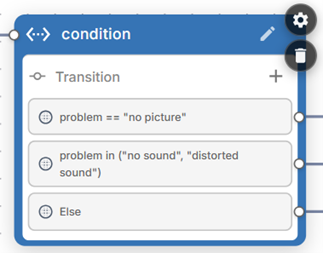
Transitions
Logical condition node has multiple transitions defined by you. In addition to that “else” transition is implicitly created and can be used as a fallback if none of user-defined conditions match.
Logical condition node settings
Global node – Enables transition to this node from any other node in the conversation flow.